
Key Takeaways
- Self-scheduling tools reduce no-shows by approximately 29% (Schedly, 2025)
- AI appointment scheduling eliminates 75% of manual scheduling time and saves organizations an average of $21,000 per year in direct costs alone (Done For You, 2025)
- Most businesses see at least 30% time savings on manual processes through automation (AI Workflow Designer, 2025)
- Helpmate’s WordPress CRM integrates appointments, tasks, and customer conversations in one unified system
No-show rates range from 12% to 80% depending on the practice, and a single service provider can lose $38,400 annually from missed appointments (Prospyr, 2026). That number stuck with me when I first saw it. Service businesses, consultancies, agencies—anyone booking time with clients—know this pain. You have the slot reserved, the prep done, and then… nothing. Worse, the scheduling chaos doesn’t stop at no-shows. You’re jumping between Calendly for bookings, spreadsheets for tracking, some other CRM for customer data, and manually firing off reminders. It’s fragmented.
WordPress CRM appointments approach this differently. When scheduling lives inside your customer management system, bookings suddenly carry context—contact histories, task lists, conversation logs, all attached to that appointment. This article walks through how to actually implement this. I’ll explain how Helpmate eliminates the scheduling headaches that drain revenue, based on what I’ve seen working for service businesses.
What Are WordPress CRM Appointments?
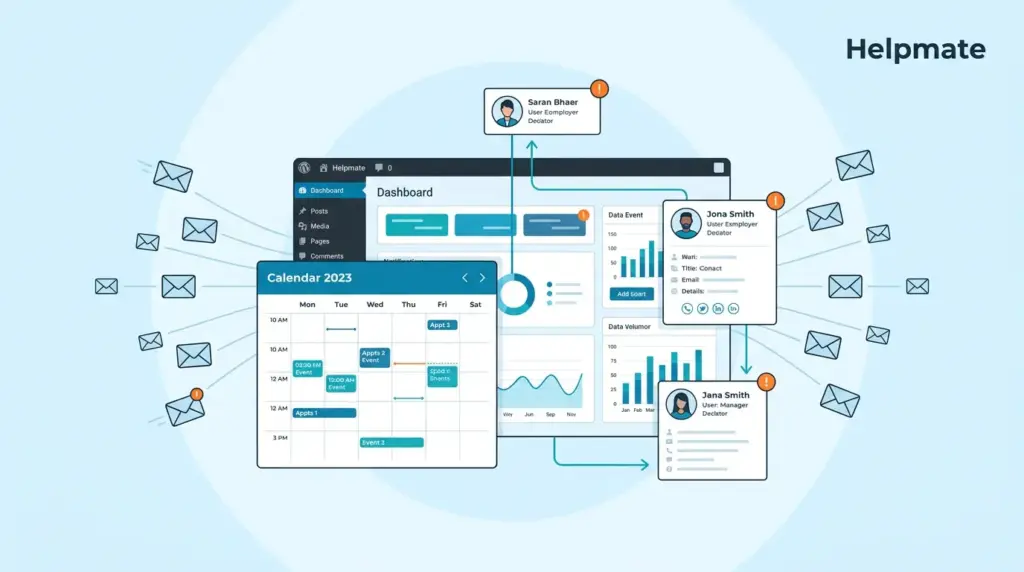
WordPress CRM appointments embed scheduling functionality directly into your customer relationship management system. Unlike standalone booking tools that operate in isolation, CRM appointments connect every booking to a contact profile, purchase history, and communication log. So when someone books, your team sees their full context—not just a name in a time slot.
The integration matters more than people initially think. Most scheduling tools capture the booking but leave customer data scattered. WordPress CRM appointments centralize everything. Booking data flows into contact records automatically. Staff knows who’s coming, what they bought last time, what conversations happened. This changes appointments from pure logistics into actual relationship touchpoints.
Key Components of CRM Appointments:
- Contact-linked scheduling: Every appointment ties to a customer profile
- Task synchronization: Bookings generate follow-up tasks automatically
- History tracking: Complete view of past appointments and outcomes
- Segmentation: Group customers by booking patterns for targeted campaigns
- Email sequencing: Automated reminders, confirmations, and follow-ups
Start your free trial today to see how integrated CRM appointments can transform your service business workflow.
Why Do Service Businesses Need CRM Appointment Tracking?
Service businesses leak revenue through inefficient scheduling. No-show rates in service industries average 18-40%, which hits the bottom line directly. Most businesses see at least 30% time savings on manual processes through automation, with an average ROI of 200% within the first year (AI Workflow Designer, 2025). But it’s not just missed appointments. Manual scheduling eats administrative hours that could go toward actual revenue work.
Disconnected systems make this worse. When your booking tool can’t talk to your customer database, you get information silos. Staff checks three different platforms to prepare for appointments. Customer data fragments. Marketing can’t use booking history for segmentation. Support has no visibility into appointment contexts during conversations—so they’re flying blind.
WordPress CRM appointment tracking addresses this through unified data architecture. Bookings update contact records automatically. Tasks sync with appointment dates. Email sequences trigger based on booking status. This integration cuts out manual data entry, reduces errors, and gives your team the context they need for informed customer interactions.
How Does Helpmate Handle Appointment Scheduling?
Helpmate approaches WordPress CRM appointments through integrated scheduling and CRM architecture. The system connects three elements: the customer database, appointment slots, and communication tools. When integrated with WordPress forms, Helpmate enables appointment creation through form submissions mapped to CRM actions.
Here’s how the workflow actually runs. A customer submits a booking request through your WordPress site. If you’re using supported form plugins—WPForms, Contact Form 7, Forminator—Helpmate maps submission data to appointment creation. This automatically creates or updates a contact in the CRM with appointment details attached. Then associated workflows trigger: confirmation emails, staff notifications, task assignments.
Helpmate offers scheduling functionality through its smart scheduling module with shortcodes and blocks for website integration. The Pro version enables advanced capabilities where form submissions trigger appointment creation actions when mapped properly in the Integrations area.
Helpmate Appointment Features:
- Appointment tracking within contact profiles for complete customer visibility
- Task synchronization with booking dates for automated follow-up scheduling
- Email integration for confirmations, reminders, and post-appointment sequences
- Segment management based on appointment history and booking patterns
- Form plugin integrations for streamlined booking capture on any WordPress page
How Do You Set Up CRM Appointments in WordPress?
Configuring WordPress CRM appointments means connecting your scheduling interface with your customer management system. Most WordPress sites already use form plugins for contact and booking forms. Helpmate integrates with these existing tools rather than forcing you to rebuild workflows.
Step-by-Step Configuration:
- Install Helpmate and connect your form plugin through the Integrations section
- Map form fields to Helpmate contact and appointment fields
- Enable the appointment creation action for your booking forms
- Configure confirmation emails in the CRM Emails Templates area
- Create automated reminder sequences using the Email Sequences feature
- Set up task templates for pre-appointment and post-appointment follow-ups
Field mapping requires attention here. Map customer name, email, phone, and appointment details—date, time, service type—to corresponding Helpmate fields. This ensures booking data flows correctly into contact records. The integration supports conditional logic too. Route different booking types to different staff assignments or segmentation tags based on the form input.
For businesses needing advanced scheduling, Helpmate offers a smart scheduling module with shortcodes and blocks. This provides embedded calendar availability directly on WordPress pages. The scheduling tool connects to your CRM contacts, maintaining context for every booking.
What Email Automation Works Best for Appointments?
AI appointment scheduling eliminates 75% of manual scheduling time and saves organizations an average of $21,000 per year in direct costs alone (Done For You, 2025). Email automation drives these savings. Self-scheduling tools reduce no-shows by approximately 29% because patients who choose their own times show stronger commitment (Schedly, 2025). The key is systematic reminder delivery—not random, not sporadic, but timed.
Helpmate supports multi-step email sequences for appointment management through its CRM Email Sequences feature. These sequences trigger based on appointment status and timeline. You design workflows that match your business needs without external email tools.
Effective Appointment Email Sequences:
- Immediate confirmation upon booking with calendar attachment
- 24-hour reminder with preparation instructions and rescheduling option
- 1-hour reminder for same-day appointments
- Post-appointment follow-up with satisfaction survey and next steps
- No-show recovery sequence with rebooking offer
Email Templates within Helpmate CRM support personalization using contact and appointment data. Include customer name, appointment date, service details, and staff assignments dynamically. This creates professional communications that reflect your brand while operating automatically.
How Can Task Tracking Improve Appointment Management?
Appointments without follow-up tasks tend to fade into forgotten commitments. WordPress CRM appointments gain power when paired with task tracking. Each booking should trigger related activities: preparation, confirmation verification, service delivery, post-appointment follow-up.
Helpmate integrates appointment data with CRM tasks. When an appointment is created, the system generates associated tasks for assigned staff members. These tasks appear in the unified activity timeline alongside emails and conversations. Staff sees complete context—not just isolated action items.
Task Automation Strategies:
- Pre-appointment tasks: Review contact history, prepare materials, confirm resources
- Day-of tasks: Send reminders, verify attendance, document outcomes
- Post-appointment tasks: Send follow-up emails, schedule next booking, update contact notes
- Escalation tasks: Flag no-shows for immediate outreach, trigger retention sequences
Task notifications keep appointments on track. Assign tasks to specific team members with due dates relative to appointment times. This ensures preparation happens and follow-up occurs systematically—not whenever someone remembers.
What Makes WordPress CRM Appointments Different from Standalone Tools?
Standalone booking tools handle calendar management well but fail at customer relationship management. They capture appointments without capturing context. Your team sees a booking but not the customer’s journey. This limits service quality and marketing effectiveness.
WordPress CRM appointments bridge this gap. Because bookings live within the same system as contact records, task management, and communication history, every appointment carries full customer context. Staff prepares better. Marketing segments smarter. Support responds with awareness of upcoming and past appointments.
| Feature | Standalone Booking | WordPress CRM Appointments |
|---|---|---|
| Customer History Access | Limited or manual lookup | Integrated, automatically linked |
| Task Integration | Requires separate tool | Native, appointment-triggered |
| Email Sequences | Basic confirmations only | Full automation, CRM-connected |
| Segmentation | Calendar data only | Booking + purchase + conversation data |
| WordPress Integration | Embed code or external link | Native forms, blocks, and shortcodes |
For businesses already using WordPress, CRM appointments eliminate platform switching. Customers book on your site. Data stays in your system. Staff manages everything from one interface.
How Do You Reduce No-Shows with CRM Automation?
No-show rates range from 12% to 80% depending on the practice, making them a critical revenue leak for service businesses (Prospyr, 2026). Self-scheduling tools reduce no-shows by approximately 29% because customers who choose their own times show stronger commitment (Schedly, 2025). The combination of convenient self-scheduling and systematic reminders drives compliance.
Helpmate addresses no-shows through multiple mechanisms. First, form-based booking gives customers control. They select times that work for them, increasing ownership of the commitment. Second, automated email sequences ensure reminders arrive at optimal intervals. Third, task tracking enables immediate follow-up on missed appointments while the context is fresh—before the lead goes cold.
No-Show Reduction Tactics:
- Enable self-scheduling through form plugins to increase booking commitment
- Configure 24-hour and 1-hour email reminders with clear cancellation options
- Set up SMS integration where available for additional reminder channels
- Create no-show follow-up tasks with scripted rebooking outreach
- Segment chronic no-shows for different scheduling policies
The financial impact adds up. A single provider losing $38,400 annually from missed appointments can recover substantial revenue through even modest no-show reduction. Automated CRM appointment workflows achieve this without piling on administrative overhead.
Which Industries Benefit Most from WordPress CRM Appointments?
Any service business can leverage appointment tracking, but certain industries see amplified benefits. Businesses with recurring customer relationships, consultation requirements, or scheduled service delivery gain the most from integrated scheduling.
High-Impact Use Cases:
- Consultancies: Track client meetings, project milestones, and follow-up scheduling within contact profiles
- Healthcare practices: Maintain patient appointment histories alongside medical notes and insurance information
- Wellness services: Connect booking data with membership status and package balances
- Professional services: Link consultations to proposal delivery and contract signing workflows
- Agencies: Coordinate client calls with project timelines and deliverable schedules
These industries share common needs. They schedule frequently with the same customers. They require context before appointments. They need systematic follow-up to maintain relationships. WordPress CRM appointments serve these needs within a unified platform rather than forcing them to duct-tape fragmented tools together.
For WordPress-based businesses, the free version of Helpmate – Live, Social & AI Chat with Built-in CRM provides foundational CRM functionality. The Pro version enables advanced appointment creation through form integrations and automated workflows.
Frequently Asked Questions
No-show rates range from 12% to 80% depending on the practice type. Healthcare and professional service businesses typically see 18-40% no-show rates. Self-scheduling tools reduce no-shows by approximately 29% because customers who choose their own times show stronger commitment (Schedly, 2025).
AI appointment scheduling eliminates 75% of manual scheduling time and saves organizations an average of $21,000 per year in direct costs alone (Done For You, 2025). Most businesses see at least 30% time savings on manual processes through automation, with an average ROI of 200% within the first year (AI Workflow Designer, 2025).
Yes. Helpmate integrates with Contact Form 7, Forminator, Ninja Forms, WPForms, and Formidable Forms. Through the Integrations section, you can map form fields to Helpmate contact and appointment fields. This enables appointment creation from form submissions without changing your existing booking workflow.
The free version includes basic CRM contact management and appointment tracking within contact profiles. Pro enables advanced features like appointment creation through form integrations, email sequences, and automated task generation. Pro is available through the pricing page.
Systematic reminders address the primary causes of no-shows: forgetting and lack of commitment. Email sequences sent 24 hours and 1 hour before appointments keep bookings top-of-mind. Clear cancellation options in reminders allow non-attendees to free slots for others. Self-scheduling further reduces no-shows by approximately 29% through increased customer commitment (Schedly, 2025).
Yes. This is the core advantage of WordPress CRM appointments. Booking data flows directly into contact profiles. You can create segments based on appointment frequency, no-show history, or service types. Tasks automatically generate from appointment dates. Email sequences trigger based on booking status. The entire system operates as a unified platform.
Conclusion
WordPress CRM appointments solve the scheduling fragmentation that costs service businesses thousands in lost revenue. By integrating booking, contact management, task tracking, and email automation in one system, Helpmate creates context-rich appointments that strengthen customer relationships while reducing administrative overhead.
Key takeaways:
- Self-scheduling reduces no-shows by approximately 29% through increased customer commitment
- Appointment automation saves 75% of manual scheduling time and $21,000 annually in direct costs
- CRM appointments connect bookings to customer history, enabling informed service delivery
- Task and email automation ensure appointments happen and relationships continue
- Helpmate integrates with existing WordPress form plugins for seamless implementation
The free version of Helpmate provides foundational CRM appointment tracking. For businesses needing automated workflows, form integrations, and email sequences, the Pro version delivers advanced functionality. Start your free trial today to see how integrated scheduling can transform your customer relationships and reduce no-shows.

