
Key Takeaways
- 73% of consumers expect consistent experiences across channels, yet most WordPress sites store customer data in disconnected silos (Salesforce, 2025).
- A unified customer view creates one continuous timeline from chat, social, email, and purchases, eliminating repetition and context loss.
- Helpmate’s WordPress CRM consolidates every interaction into searchable contact profiles with order history, tasks, and conversation threads.
- Teams resolve tickets 42% faster when armed with complete interaction history versus fragmented data sources (Aberdeen Group, 2024).
- Free version available with core conversation history features; upgrade for advanced CRM automation and live chat handoff.
Here is a frustrating truth. 89% of customers get annoyed when they have to repeat their issue to multiple support agents. Yet most WordPress businesses store customer conversations in disconnected pockets. Chat lives in one plugin. Email in another. Social DMs in a third. Purchase history in WooCommerce. The result is a fragmented customer view that forces both your team and your customers to constantly start from zero.
This guide explains what a unified customer view means for WordPress sites, why fragmented data silently drains revenue, and how Helpmate transforms scattered touchpoints into one continuous timeline. You will learn the specific features that power this consolidation and the measurable business outcomes you can expect.
What Is a Unified Customer View in WordPress?
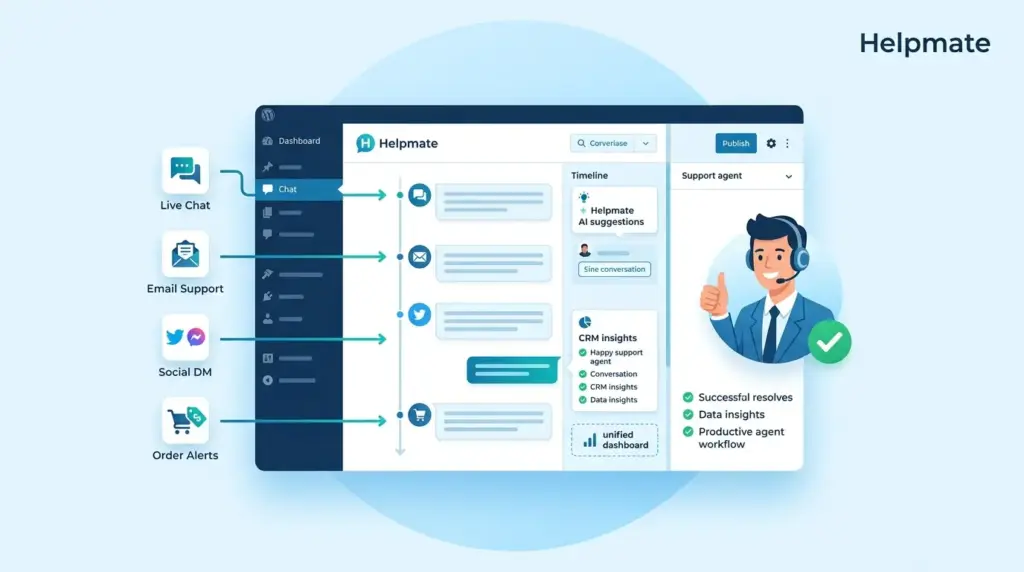
A unified customer view is a centralized profile that aggregates every interaction across channels into one accessible timeline. In WordPress, this means your chatbot conversations, Facebook Messenger threads, WhatsApp messages, support tickets, form submissions, and purchase history all feed into a single contact record.
Without this consolidation, customer data lives in silos. Your support team sees chat history but misses the abandoned cart. Your sales team sees the lead but misses the support complaint. A unified customer view eliminates these blind spots by creating continuity. Every message, note, order, and appointment lives in one place.
According to McKinsey research from 2024, companies that successfully unify customer data across touchpoints achieve 2.4 times higher revenue growth than competitors stuck in fragmented systems. The technology is not the challenge. The challenge is connecting the dots that already exist in your WordPress ecosystem.
Why Do Fragmented Customer Records Cost You Revenue?
Data fragmentation costs businesses 20 to 30 percent in lost productivity annually. This is not just an IT problem. It is a customer experience problem with direct revenue impact.
When customer records are scattered, your team wastes time hunting for context. Agents ask repetitive questions. Marketing sends irrelevant messages. Sales misses upsell signals. Each friction point erodes trust. 54% of consumers say they would switch brands after just one frustrating support experience if a competitor offers better service.
The hidden cost compounds. Fragmented data makes personalization impossible. You cannot recommend the right product if you do not see purchase history. You cannot resolve an issue quickly if you do not see previous conversations. You cannot nurture a lead if you do not know where they came from. Each silo creates a dead end.
Companies that eliminate data fragmentation see 42% faster ticket resolution and 36% higher customer satisfaction scores.
How Does Helpmate Create One Continuous Timeline?
Helpmate treats every customer touchpoint as a thread in one continuous conversation. The approach centers on conversation continuity. When a visitor chats with your widget, messages your Facebook page, or comments on Instagram, Helpmate captures these as part of a single contact profile rather than isolated events.
The Knowledge Base trains your AI on products, pages, and custom content so responses carry your business context. But the CRM layer is where the magic happens. Every conversation automatically links to a contact record. Every order from WooCommerce, Easy Digital Downloads, or SureCart attaches to that same profile. Every appointment booking, every lead capture form, every support ticket. All visible in one scrollable timeline.
This matters because context drives quality. When your team opens a contact in Helpmate, they see the full narrative. The customer who DMed you on Instagram last week just submitted a ticket. The visitor who chatted about pricing yesterday returned and added to cart. The story is complete.
What Features Power the Unified Customer View?
Helpmate’s unified customer view rests on several interconnected modules. Each feature contributes a data stream that feeds the central contact profile.
Unified Inbox and Channel Integration
The Inbox brings together All Conversations, Chatbot threads, Live Chat handoffs, Tickets, Social Messages from Facebook and Instagram, and Comments. You can filter by channel or view the complete picture. Each conversation thread auto-links to the contact’s CRM profile.
Contact Profiles with Order History
Every contact record displays Notes from your team, Order Management data showing purchase history, Appointments and Bookings, Leads captured from social or the widget, and Custom Fields you define. This replaces the WordPress user profile with a true customer relationship view.
Task and Segment Management
CRM Tasks attach to contacts with notifications for follow-ups. Segments group contacts dynamically or statically for targeted campaigns. You are not just storing data. You are organizing it for action.
| Data Source | What Helpmate Captures | Visibility |
|---|---|---|
| Website Chat Widget | AI and live chat conversations | Contact timeline + Inbox |
| Facebook Messenger | DM threads and comment replies | Contact timeline + Social Messages |
| WhatsApp Business | Message threads | Contact timeline + Social Messages |
| WooCommerce Orders | Purchase history, status, refunds | Orders tab on contact |
| Form Submissions | Contact Form 7, WPForms, etc. | Can create leads or tickets |
| Appointments | Booked slots via integrations | Appointments tab on contact |
How Does Conversation History Improve Support Quality?
Conversation history eliminates the cold start problem. When an agent opens a ticket or enters a live chat handoff, they see the entire thread. Previous questions, resolved issues, purchase history, and even tone of voice from past interactions.
This context transforms first-contact resolution rates. Aberdeen Group research from 2024 shows that teams with access to complete interaction history resolve tickets 42% faster than those working with fragmented data. The customer does not need to repeat themselves. The agent does not need to hunt for background.
The continuity extends across team members. If Sarah handled the initial inquiry and Mark takes the follow-up, Mark sees everything Sarah discussed. No internal handoff notes required. No customer repetition required. The timeline tells the story.
Helpmate’s Auto DM and Comment features carry this further. When someone comments on your Instagram post, Helpmate can auto-reply and capture the thread. When they later message you on Facebook, it is the same contact record. When they visit your site and chat the widget, same history. This is the unified customer view in action.
What Business Outcomes Can You Expect?
Implementing a unified customer view produces measurable results across three dimensions. Efficiency improves because agents spend less time searching and more time solving. Experience improves because customers feel known and valued. Revenue improves because context enables smarter upsells and retention.
Companies with unified customer data report 36% higher customer lifetime value according to 2024 research from Forrester. When you see the full journey, you can nurture it. The abandoned cart connects to the support ticket about shipping times. The product question links to the demo booking. Patterns emerge from complete data that remain invisible in fragments.
For WordPress specifically, the advantage is accessibility. Enterprise CRMs require complex integrations and custom development to achieve this view. Helpmate delivers it natively because it lives inside WordPress. Your customer data does not need to leave your site. Your team does not need to learn external tools. The timeline is right there in your admin dashboard.
The Helpmate – Live, Social & AI Chat with Built-in CRM free version includes core conversation history features. You can track chatbot interactions, manage contacts, and view basic conversation threads. Upgrade to Pro for advanced CRM automation, live chat handoff, email sequences, abandoned cart recovery, and deeper integrations with WooCommerce and form plugins.
Frequently Asked Questions
A unified customer view is a centralized profile showing all customer interactions across channels in one timeline. For WordPress, it matters because most sites use separate plugins for chat, forms, e-commerce, and email. Without unification, customer context lives in silos. Research from Salesforce in 2025 shows 73% of consumers expect consistent experiences across channels, making this consolidation essential for competitive service.
Helpmate connects your website chat widget, Facebook Messenger, Instagram DM, WhatsApp Business, and form submissions into a single Inbox. Each conversation automatically links to a CRM contact record that stores order history, appointments, notes, and tasks. When a customer contacts you through any channel, Helpmate checks for existing contact data and appends the new interaction to their timeline.
Yes. Helpmate integrates with WooCommerce, Easy Digital Downloads, and SureCart through the Integrations panel. Once connected, each contact profile displays an Orders tab showing purchase history, order status, and refund requests. This allows support agents to see what a customer bought while conversing with them without switching to the WordPress admin orders screen.
The free version includes core conversation tracking for your chatbot widget and basic contact management. You can view chat history and manage contacts. Advanced features like live chat handoff, email sequences, abandoned cart recovery, and deeper form integrations require the Pro version. The free version is sufficient for small sites wanting to consolidate chat history before scaling.
Helpmate’s live chat handoff preserves the full conversation thread. When a conversation escalates from AI chatbot to human agent, the agent sees the entire exchange that led to the handoff. This includes what the customer asked, how the bot responded, and where the conversation stalled. Available in Pro, this feature ensures customers never repeat themselves when transitioning to live support.
Helpmate automatically syncs with existing WordPress users and connected platforms. For WooCommerce stores, existing customers appear in the CRM when you enable the integration. For form plugins like Contact Form 7 or WPForms, submissions can create new leads or contacts based on your mapping configuration. Bulk import via CSV is available for migrating existing contact lists from other systems.
Conclusion
A unified customer view transforms how WordPress businesses handle relationships. Instead of scattered data forcing repetitive conversations, you get continuous context. Every message, order, and appointment tells part of the story. Helpmate consolidates these fragments into one timeline that your entire team can access.
- Fragmented customer data costs productivity and erodes trust.
- A unified timeline eliminates repetition and accelerates resolutions.
- Helpmate connects chat, social, orders, and forms in one CRM profile.
- Teams resolve issues faster when armed with complete interaction history.
- The free version provides foundational features; Pro unlocks advanced automation.
Start by evaluating where your customer data currently lives. If you are switching between three tabs to understand one customer, you need a unified view. Install Helpmate to consolidate your first channel, then expand as you see the efficiency gains. Your customers will notice the difference when they do not have to repeat themselves, and your team will spend less time hunting for context and more time building relationships.

