
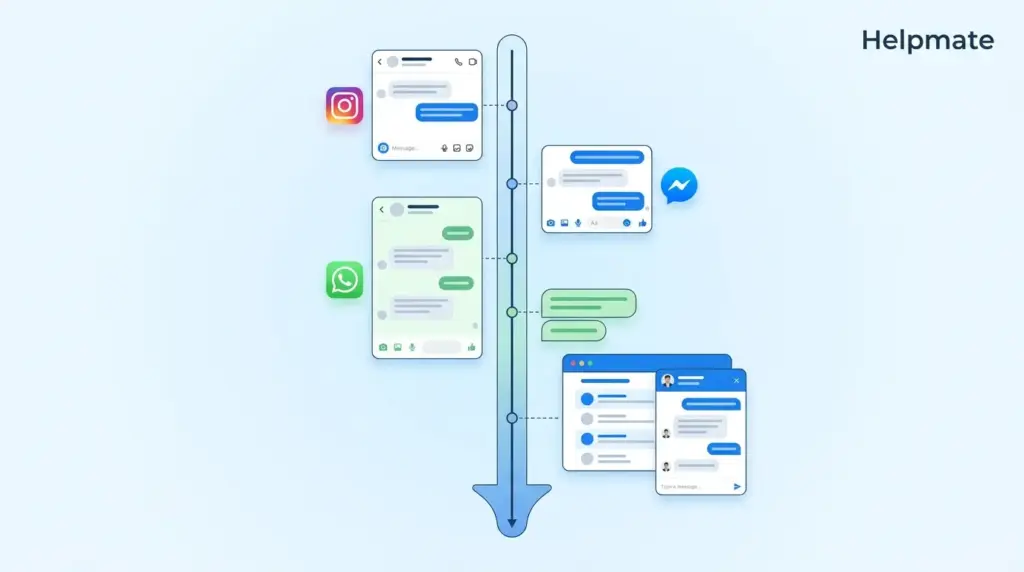
TL;DR: Support teams lose something like 20-30% of their time just trying to piece together what customers already told them. A unified social CRM for WordPress eliminates this by connecting Facebook Messenger, Instagram DMs, WhatsApp, and website chat widget history into one chronological timeline. Companies with strong omnichannel engagement retain 89% of customers versus 33% for those with weak channel integration, according to Aberdeen Group research.
Your customer just sent a DM on Instagram about the order they placed yesterday. They also started a chat from your website three days ago about product specifications. In most WordPress setups, these two conversations exist in completely separate systems. The support agent handling the Instagram message has no visibility into the website chat. The customer has to repeat everything. This fragmentation is one of those hidden costs that doesn’t show up on a spreadsheet but definitely shows up in your team’s exhaustion.
This guide explains how a unified social CRM changes the equation. You’ll see why conversation context matters, what actually breaks when history lives in silos, and how to build a complete customer timeline that follows people across channels without them having to announce themselves every time.
Why Does Conversation Context Matter for Support Teams?
73% of customers expect companies to understand their previous interactions, according to Salesforce research. This expectation isn’t really about convenience. It’s about respect for the customer’s time and the complexity of their relationship with your brand.
When a customer reaches out, they’re rarely starting from zero. They’ve browsed products, asked questions, made purchases, or reported issues. Each interaction builds a narrative. Without access to that narrative, support agents treat every message as a first contact. This forces customers to repeat information they’ve already provided. It extends resolution times. It creates frustration that directly impacts loyalty in ways that are hard to measure but easy to feel.
Context also determines how an agent should respond. A customer asking about “delivery status” means something completely different if they have an active order versus if they’re still deciding whether to purchase. The same question requires different tools, different tone, and different follow-up actions. When agents can’t see the full picture, they guess. Sometimes they guess wrong.
The cost of context switching extends beyond the single conversation. Agents who spend time hunting for information in separate platforms have less time for actual problem solving. Morale suffers. Turnover increases. Training becomes harder because tribal knowledge about customer history lives in scattered locations that new hires can’t easily access.
What Breaks When Customer History Lives in Silos?
89% of customers get frustrated when they have to repeat their issue to multiple representatives, according to Accenture. This frustration has specific, measurable consequences for your business.
Channel switching creates repetition. A customer might start on Instagram, move to email for documentation, then return to your website chat for quick clarification. In a siloed system, each channel restart wipes the slate clean. The customer becomes a stranger three times in the same support journey. Three times.
Agent efficiency collapses. When history is fragmented, agents must manually search across platforms. They check WooCommerce for orders. They check Facebook Business Manager for DMs. They check a separate live chat tool for website conversations. This multi-tool workflow introduces delays and increases error rates. Agents start dreading certain types of tickets because they know the archaeology involved.
Opportunity identification fails. Support interactions are sales opportunities when you know the context. A customer asking about a product they viewed twice this week is different from a customer asking about a product they just discovered. Siloed systems hide these signals. Agents miss chances to recommend, upsell, or prevent abandonment because they can’t see the pattern.
Compliance and quality suffer. When conversation records are scattered, auditing becomes difficult. You cannot easily review a complete customer journey to identify service gaps or training needs. Dispute resolution lacks the documentary evidence that full context provides. Three months later, when someone asks “what did we tell this customer?” nobody can reconstruct it.
How Does a Unified Social CRM Solve the Fragmentation Problem?
A unified social CRM for WordPress creates a single source of truth for customer interactions. Instead of separate inboxes for Facebook Messenger, Instagram DMs, WhatsApp, and website chat, you get one chronological timeline that captures everything.
The technical foundation is an integration layer that connects each channel to a central database. When a customer sends a message on Instagram, the system captures the content, timestamp, and channel identifier. It links this interaction to a contact record. When the same customer starts a chat on your website, the system recognizes them through email, phone, or authenticated session. The website chat joins the same timeline as the Instagram DM.
This unification happens in real time. There is no batch sync delay. When an agent opens a conversation, they see the complete history up to the current moment. They see that the customer asked about sizing on Instagram yesterday and is now asking about shipping on the website. They can reference the earlier conversation naturally. The customer feels recognized rather than processed.
Companies with strong omnichannel engagement retain 89% of customers compared to 33% for companies with weak channel integration, according to Aberdeen Group research. The mechanism behind this statistic is simple. Customers stay with businesses that make their lives easier. Remembering context across channels is one of the most powerful ways to demonstrate that commitment.
What Information Appears in a Complete Customer Timeline?
A unified customer timeline is more than a chat log. It is a comprehensive record of the relationship between your business and the individual. The specific data points vary by integration, but a complete system typically includes several categories of information.
Cross-channel messages. Every message from every connected channel appears in chronological order. This includes Facebook Messenger conversations, Instagram DMs, WhatsApp messages, and website chat transcripts. Each message is tagged with its source channel and timestamp so you can see exactly when and where each interaction happened.
Order and transaction history. When integrated with WooCommerce, Easy Digital Downloads, or SureCart, the timeline shows purchase history. Agents see what the customer bought, when they bought it, and the current order status. This contextualizes support questions. A question about “my order” immediately connects to the specific order without requiring the customer to provide order numbers they’ve already forgotten.
Lead capture events. The timeline records when and how the customer entered your system. This might be a lead form submission, a newsletter signup, or a social media follow that triggered automation. These events help agents understand the customer’s journey stage.
Appointment and booking data. For businesses using scheduling integrations, the timeline shows past and upcoming appointments. This is crucial for service businesses where support questions often relate to booked services.
Notes and tasks. Agents can add internal notes that persist across the team. Tasks and follow-up reminders attach to the contact record, ensuring continuity even when different agents handle different interactions. That note you left last Tuesday about the customer’s preferred shipping method? It’s still there when they email back on Friday.
How Do You Connect Social DMs to Website Chat Records?
Connecting social channels to website chat requires three technical components. Each component serves a specific purpose in creating the unified view.
Channel authentication. The system must establish authenticated connections to each social platform. For Facebook and Instagram, this means connecting via the Meta Business platform. For WhatsApp, this requires the WhatsApp Business API. These connections grant permission to read and respond to messages from within the WordPress dashboard.
Identity resolution. The challenging part is recognizing when the same person appears on different channels. Email addresses are the most reliable identifier. When a customer provides their email in a website chat, the system can link that chat to any previous interactions where the same email was captured. Phone numbers serve a similar function. Some systems also use browser cookies and authentication states to connect anonymous website visitors to known contacts.
Data synchronization. Once connections are established, messages flow in both directions. Incoming messages from social channels appear in the unified inbox. Responses sent from the unified inbox appear on the original social channel. The customer experiences seamless communication regardless of which channel they use.
The free version of Helpmate – Live, Social & AI Chat with Built-in CRM provides foundational social chat management and channel connections. Paid plans expand identity resolution capabilities and increase historical data retention.
When Should Support Teams Switch from Bot to Human Handoff?
70% of consumers expect consistent experiences across channels, according to McKinsey research. This consistency includes knowing when to escalate from automated responses to human agents. The customer timeline is essential for making this decision correctly.
Effective handoff requires two conditions. First, the system must recognize when a conversation exceeds bot capabilities. This might be detected through sentiment analysis, specific keywords, or repeated failed intent recognition. Second, the human agent must receive the full context of the conversation so far. Without the timeline, the customer has to restart their explanation. The efficiency gain of AI customer service automation is lost.
The timeline enables intelligent routing rules. A customer with a high lifetime value and a complaint about a recent order might bypass the bot entirely based on historical data triggers. A customer asking generic questions might interact with the bot for longer before handoff. These decisions require access to the complete customer record.
Agent availability also factors into handoff timing. The unified inbox shows which agents are online and their current workload. This prevents the frustration of being transferred to a human who is not actually available to respond immediately.
How Do Order Details and Purchase History Enrich Support Context?
Commerce integration transforms support from reactive to proactive. When order data is visible in the customer timeline, agents can answer questions before customers fully ask them.
A customer asking “where is my package” is a common support scenario. With integrated order data, the agent sees the order number, shipping status, and tracking information immediately. They can provide a specific answer. Without integration, the agent must ask for the order number, look it up in a separate system, and only then provide assistance. The interaction takes three times as long and feels transactional rather than helpful.
Purchase history also enables personalization. An agent can see that a customer has bought three similar products over the past year. They can recommend accessories that complement the existing collection. They can identify VIP customers for special handling without the customer having to announce their status or quote their lifetime spend.
Return and refund requests benefit from historical context. The timeline shows when the item was purchased, what communications have already occurred about the issue, and whether the customer has a history of returns. This context helps agents apply the correct policies and identify patterns that might indicate product or service problems.
Frequently Asked Questions
Yes. With a unified social CRM plugin like Helpmate, Instagram DMs appear in the same inbox as website chat messages. The timeline shows both channels chronologically, so you can see when a customer moved from Instagram to your website. 73% of customers expect companies to understand their previous interactions across channels, according to Salesforce.
No. Identity resolution connects channels automatically when the system recognizes an email, phone number, or authenticated session. Once linked, the customer timeline follows them. This prevents the frustration that 89% of customers feel when forced to repeat issues, according to Accenture research.
Yes. When integrated, WooCommerce orders appear directly in the customer timeline. Agents can see order status, items purchased, and shipping information without leaving the conversation screen. This integration is available in Helpmate through the Commerce integrations panel.
Historical sync depth depends on platform APIs and your plan. Generally, social channel connections pull 30 to 90 days of message history initially. Website chat history depends on when the chat widget was installed. Paid plans typically offer longer retention and deeper historical imports than free versions.
Yes. The unified inbox supports team collaboration with role-based access controls. Multiple agents can view the same customer timeline, though conversation assignment ensures clear ownership. Internal notes allow agents to add context for colleagues without the customer seeing them.
Messages synced to your CRM remain in the timeline even if deleted from the social platform. This creates a permanent record for compliance and service quality review. However, the customer experience on the social platform itself will show the deletion according to that platform’s interface rules.
Yes. Companies with strong omnichannel engagement, including unified conversation history, retain 89% of customers annually compared to 33% for companies with weak integration, according to Aberdeen Group. The continuity of experience directly impacts loyalty and repeat purchase behavior.
Conclusion
Seeing customer history across social and website chat is no longer a premium feature reserved for enterprise support stacks. WordPress businesses of any size can now unify Facebook Messenger, Instagram DMs, WhatsApp, and website chat into a single timeline. The benefits are measurable and immediate.
- Eliminate the 20-30% efficiency loss from context gathering
- Stop forcing customers to repeat information across channels
- Increase retention through consistent, informed support experiences
- Enable agents to identify sales opportunities hidden in conversation history
- Build compliance and quality documentation automatically
The technology exists. The integrations are available. The only remaining question is whether your support operation will continue paying the hidden tax of fragmented conversation data or capture the advantage of unified context. Start by evaluating which channels your customers actually use, then connect them to a single source of truth. Learn more about Helpmate and how it can transform your customer conversations.

