
Every missed message is a missed opportunity. When visitors message your business through Instagram DM or Facebook Messenger, they expect immediate engagement. Yet 55% of companies take five or more days to respond to social inquiries (Hootsuite, 2025). That delay costs you qualified leads and revenue.
Key Takeaways
- Responding within 5 minutes increases conversion chances by up to 400%. Lead response time directly impacts your bottom line (LeadOwl, 2025).
- Automated lead capture eliminates manual data entry by instantly creating CRM contacts from chat and social conversations.
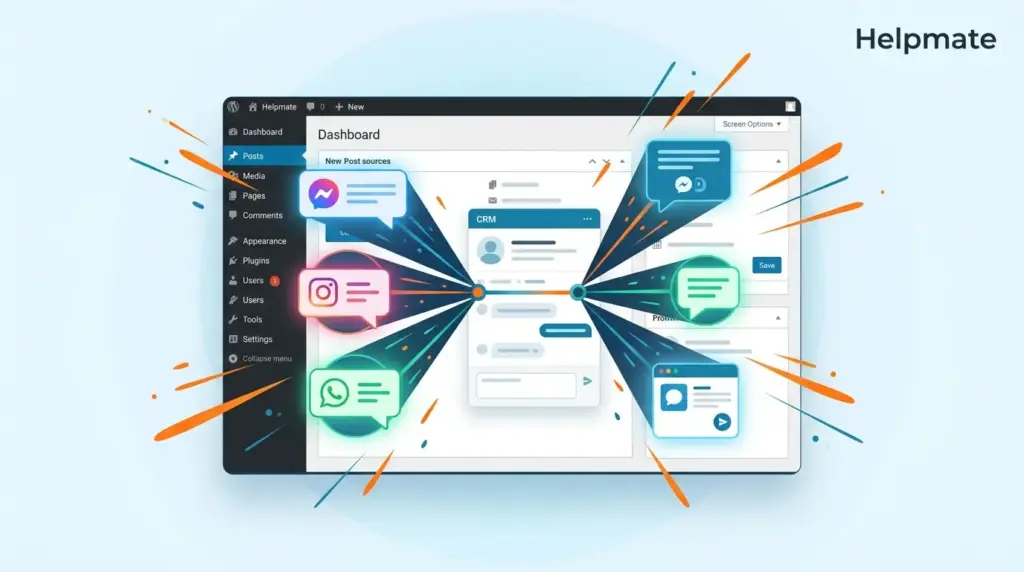
- Helpmate captures leads from Messenger, Instagram DM, WhatsApp, and live chat. All conversations sync into a unified WordPress CRM.
- Social chat generates 3x higher conversion rates than traditional website forms due to conversational context.
- Lead capture forms through Contact Form 7, WPForms, and other plugins can auto-create CRM records with proper field mapping.
Why Does Response Time Matter for Lead Conversion?
Leads are 21 times more likely to convert when contacted within 5 minutes compared to 30 minutes later (Lead Response Management via Verse.ai, 2025). The physics of attention are brutal. A visitor who messages your page is actively engaged right now. Their intent peaks at the moment of contact and decays rapidly.
After just five minutes pass, the odds of qualifying that lead plummet by 80% (Kixie, 2025). The difference between immediate response and delayed follow-up is the difference between a thriving pipeline and a leaking funnel. Manual monitoring of multiple social channels makes sub-5-minute response times nearly impossible for small teams.
Automated lead capture solves this timing crisis. When a message arrives, the system immediately acknowledges the contact and creates a CRM record. This instant confirmation satisfies the visitor’s expectation of immediate response while your team prepares a personalized follow-up.
How Does Social Chat Compare to Traditional Lead Forms?
Social messaging generates 3x higher conversion rates than website contact forms (Facebook Business, 2025). The reason is psychological friction. Forms require work. Visitors must navigate to a page, fill fields, solve captchas, and wait. Conversations flow naturally. A DM feels like texting a friend, not applying for a loan.
Additionally, social conversations carry rich context. When someone messages from Instagram, you see their profile, interests, and engagement history. This data creates a more complete lead profile than a bare email submission ever could. The conversational format also pre-qualifies leads organically. People who message demonstrate higher intent than passive browsers.
WordPress sites traditionally struggle with social integration. They capture form submissions but miss the DMs happening on Facebook and Instagram. This disconnect fragments your lead data across platforms. Automated lead capture bridges this gap by treating social messages as first-class CRM entries.
Ready to capture leads from every channel? See how Helpmate unifies your social and live chat conversations into one CRM.
What Channels Should You Monitor for Lead Capture?
65% of consumers prefer messaging over calling or emailing businesses (Zendesk, 2025). This preference spans multiple platforms. Effective lead capture requires monitoring where your audience already spends time. Each channel attracts different buyer types and conversation styles.
Facebook Messenger remains the dominant business messaging platform with over 1 billion monthly active users. It integrates seamlessly with Facebook Pages and supports rich features like carousels and quick replies.
Instagram Direct Messages capture younger demographics and visually-oriented buyers. 90% of Instagram users follow at least one business account (Instagram, 2025). DMs from Instagram carry implicit purchase intent, especially from product post interactions.
WhatsApp Business dominates international markets and high-consideration purchases. The platform’s encryption and business verification build trust for sensitive transactions.
Live Chat on your WordPress site captures visitors at peak buying intent. These users already navigated to your site and initiated contact. They represent your hottest leads.
Rather than managing these channels separately, unified inbox systems centralize all conversations. Every message becomes a CRM contact regardless of origin.
How Does Automated Lead Capture Work in WordPress?
Automated lead capture operates through three synchronized stages. First, the system monitors connected channels for incoming messages. Second, it extracts contact information and conversation context. Third, it creates or updates CRM records with this data.
When a visitor messages your Facebook Page, the automation triggers instantly. The system captures their name, profile ID, and message content. If this person exists in your CRM, it appends the conversation to their record. If new, it creates a contact entry with all available social data.
Advanced configurations map form submissions to CRM actions. When visitors submit Contact Form 7 or WPForms entries, the integration routes that data directly into your WordPress CRM systems. This eliminates the export-import dance between form tools and customer databases.
The automation extends to lead routing. New leads automatically assign to team members based on rules you define. Rotating assignments, geography tags, or product interest can determine who owns each conversation.
What Data Should You Capture for Each Lead?
Comprehensive lead capture goes beyond name and email. Rich data profiles enable personalized follow-up that converts. The most effective automated systems capture four data categories.
Identity Information: Name, email, phone number, and social profile IDs. This data enables multi-channel follow-up and prevents duplicate records.
Source Attribution: Which channel originated the conversation? Messenger, Instagram, WhatsApp, or live chat? Which specific campaign or post triggered the engagement? This attribution informs marketing budget allocation.
Conversation Context: The actual message content and any subsequent replies. This transcript follows the contact record, eliminating repetition when human agents take over.
Behavioral Signals: Page visits before messaging, products viewed, and engagement history. These signals indicate buying intent and interest areas.
Custom fields extend this foundation. You might capture company size, budget range, or specific service interests. This segmentation powers targeted email campaigns and sales prioritization.
How Do You Set Up Lead Capture Without Coding?
Modern WordPress plugins enable sophisticated lead capture without developer involvement. The setup process typically completes in under 30 minutes through configuration screens rather than code editors.
First, connect your social accounts through OAuth authentication. This grants the plugin permission to monitor messages and profiles. Facebook, Instagram, and WhatsApp each require separate authorization through Meta’s business platform.
Next, configure your chat widget appearance and behavior. Set when the widget appears, what greeting message displays, and which fields to request from visitors. Enable lead collection to capture contact information automatically.
Then, integrate with your existing form plugins. Map form fields to CRM properties so submissions flow directly into contact records. Test the integration with sample submissions before going live.
Finally, establish automation rules. Define when to assign leads to team members, when to tag contacts, and when to trigger email sequences. These rules run automatically once configured.
Start your automated lead capture setup today. Install Helpmate and connect your Messenger, Instagram, and WhatsApp accounts in minutes.
For WordPress sites seeking this capability, Helpmate – Live, Social & AI Chat with Built-in CRM provides automated lead capture from Messenger, Instagram, WhatsApp, and live chat. The free version includes core lead collection features, with advanced automation available in the Pro tier.
What Are Common Lead Capture Mistakes to Avoid?
Even automated systems fail when poorly configured. The most damaging mistake is over-collecting information. Asking for phone numbers, company names, and budget ranges before establishing value kills conversion rates. Capture only essential data initially. Request additional details during the conversation as trust builds.
Another critical error is delayed human handoff. Automation handles initial capture and qualification, but complex questions require human expertise. Set clear thresholds for when conversations escalate to live agents. Visitors who sense they are trapped in bot loops abandon conversations quickly.
Segmentation neglect wastes captured leads. Dumping all contacts into a generic list ignores the contextual data you collected. Segment by source, interest, and engagement level. Tailored follow-up outperforms bulk blasts by 200% or more (Mailchimp, 2025).
Privacy compliance failures create legal liability. Ensure your capture forms include consent checkboxes for marketing communications. Honor unsubscribe requests immediately across all channels. GDPR and CCPA regulations apply to social chat data just as they do to website forms.
Frequently Asked Questions
Respond within 5 minutes for maximum conversion impact. Responding within this window increases conversion chances by up to 400% compared to delayed follow-up (LeadOwl, 2025). After 5 minutes, the odds of qualifying a lead drop by 80%. Automated systems ensure instant acknowledgment while you prepare personalized responses.
Yes. Instagram Direct Messages integrate with WordPress CRM systems through the Instagram Business API connection. When someone DMs your business account, the automation captures their profile information and message content. This creates a CRM contact instantly without manual copying between platforms.
Live chat captures visitors already on your website, indicating high purchase intent and immediate interest. Social chat captures audiences where they spend personal time, building relationships earlier in the buyer journey. Live chat leads convert faster, while social chat leads often have higher lifetime value due to relationship depth. Effective strategies capture both.
Advanced CRM systems deduplicate contacts using email addresses as the primary key. When a message arrives from a known email, the system appends the conversation to the existing record rather than creating a duplicate. Social profile IDs provide secondary matching when email differs. Regular CRM hygiene and merge functions clean up any duplicates that slip through.
No. Modern WordPress plugins configure through admin dashboards without code. OAuth connections handle social platform authentication through click-to-connect buttons. Form field mapping uses dropdown selectors. Automation rules set through conditional interfaces. The technical complexity is abstracted by the plugin architecture.
Helpmate integrates with Contact Form 7, WPForms, Forminator, Ninja Forms, and Formidable Forms. The integration discovers existing forms through REST API and maps submission fields to CRM properties. This enables traditional form submissions to sync automatically with your contact database without export-import processes.
Captured leads trigger configurable automation sequences. They receive immediate acknowledgment messages. CRM segments organize them by source and interest. Email campaigns nurture them over time. Tasks assign to sales team members for personal follow-up. The entire lifecycle from first message to conversion maintains continuity across channels and team members.
Key Takeaways for Automated Lead Capture
- Speed dominates conversion. Sub-5-minute response times increase qualification odds by 400%.
- Social messaging outperforms forms. Conversational interfaces generate 3x higher conversion rates.
- Unified capture eliminates data silos. All channels flow into a single CRM for complete visibility.
- Automation handles initial response, but human handoff remains crucial for complex sales.
- Segmentation and personalization multiply results. Generic follow-up wastes captured interest.
Automated lead capture transforms scattered social conversations into organized revenue opportunities. The technology exists today to respond instantly, capture completely, and nurture systematically. Implementation requires configuration, not coding. The competitive advantage belongs to businesses that eliminate the gap between visitor interest and sales response.

