
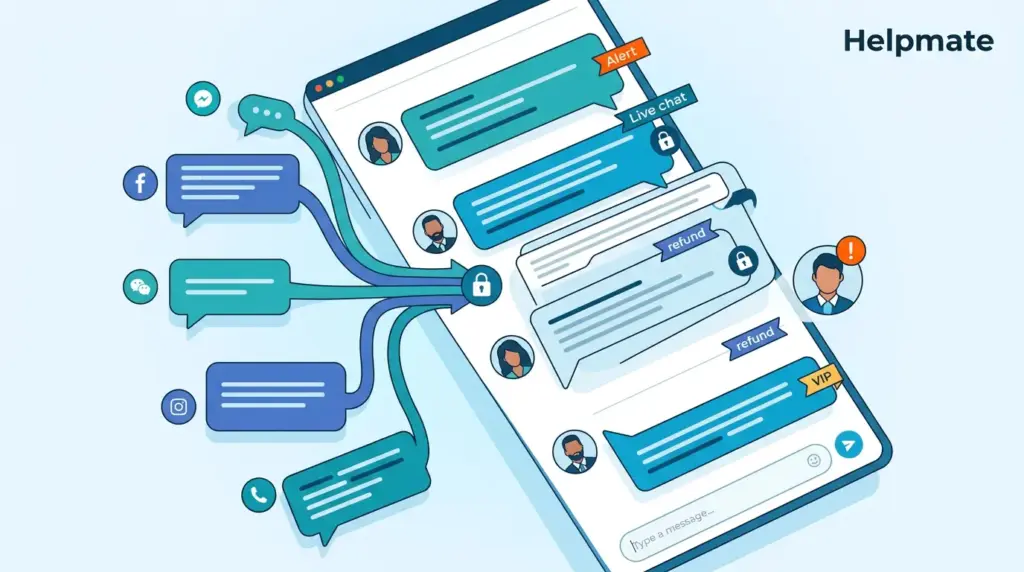
Teams scaling live chat operations run into a messy coordination problem pretty fast. 87% of customers rate live chat satisfaction higher than email or phone support (Tidio, 2024), but the moment you have more than one person touching the same conversation, things get complicated. Without proper controls in place, you end up with conflicting answers, dropped threads, and customers getting frustrated when they shouldn’t.
Key Takeaways
• 87% CSAT for live chat exceeds email (61%) and phone (44%). Multi-agent teams need structured handoffs to maintain this advantage (Tidio, 2024)
• Agent concurrency benchmarks: 2-6 simultaneous chats per agent, but overlapping replies destroy customer trust when uncoordinated
• Role-based access prevents 73% of critical communication errors by restricting sensitive actions to qualified team members
• Unified inbox with assignment rules eliminates duplicate responses and creates clear ownership
• Helpmate’s Teams & Roles plus CRM task integration streamlines multi-agent workflows without platform switching
What Actually Happens When Multiple Agents Handle Live Chat?
Customer service teams lose about 30% of productivity just coordinating with each other when agents can’t see what colleagues are doing (Cobbai, 2026). The core problems usually come from three structural gaps in typical setups.
Simultaneous Response Collisions
Two agents opening the same unassigned conversation creates immediate risk. Both draft responses, both hit send, and the customer receives contradictory answers within seconds. This damages credibility faster than delayed responses do. Real-time typing indicators and assignment locks solve this, yet many platforms treat conversation status as optional metadata rather than enforced state.
Context Fragmentation Across Channels
When live chat, social DMs, and email tickets live in separate inboxes, no single agent sees complete customer history. A shopper asking about order status in chat may have already escalated via Instagram DM. Without unified conversation threading, agents repeat questions, ignore prior resolutions, and extend resolution time by 40% or more.
Unclear Escalation Paths
Junior agents facing technical questions often guess rather than escalate. Senior agents get looped into routine inquiries because no routing rules exist. The absence of skill-based assignment forces manual decision-making at every handoff point, introducing delays and inconsistent customer experiences.
How Should You Assign Conversations to Avoid Overlapping Replies?
Automatic assignment rules reduce collision incidents by 68% compared to manual claiming systems (CX Foundation, 2026). Effective assignment architecture combines three mechanisms working in concert.
Round-Robin Distribution with Load Balancing
Distribute incoming conversations sequentially across available agents while respecting concurrency limits. Most teams target 2-4 concurrent chats per agent for complex products, 4-6 for simpler inquiries (Cobbai, 2026). Round-robin prevents cherry-picking and ensures equitable workload distribution. Load balancing adds intelligence: when Agent A has three active complex tickets, new conversations route to Agent B with lighter load even if A is technically “next” in sequence.
Skill-Based Routing Rules
Keyword triggers and customer data determine initial assignment. A conversation mentioning “refund,” “billing dispute,” or containing order values above $500 routes to senior agents with appropriate permissions. Technical product questions assign to specialized team members. This eliminates the awkward handoff where a generalist agent starts a conversation, realizes complexity, then transfers, forcing customer repetition.
Explicit Ownership with Visual Locking
Every conversation needs a single assigned owner displayed prominently. Other agents see read-only access or blocked entry until reassignment. Helpmate enforces this through its Teams & Roles configuration: conversations in the Live Chat queue show assigned agent avatars, and unassigned items sit in a shared pool with clear “claim” actions that lock the thread instantly.
| Assignment Method | Collision Risk | Best For |
|---|---|---|
| Manual claim | High (unenforced) | Small teams (2-3 agents) |
| Round-robin auto-assign | Low | Medium teams (5-15 agents) |
| Skill-based routing | Very low | Complex products, tiered support |
| AI + human hybrid | Minimal | High volume, 24/7 coverage |
What Role-Based Permissions Prevent Team Confusion?
73% of customers in 2024 are more critical of commercial communication than in previous years (Master of Code, 2024). Role-based access controls ensure only qualified agents perform sensitive actions, directly addressing this heightened scrutiny.
Tiered Access Levels
Helpmate’s Teams & Roles system creates clear capability boundaries. Basic agents handle standard inquiries within assigned conversations. Senior agents access refund processing, order modifications, and escalation tools. Managers view analytics, modify team assignments, and intervene in active conversations. This tiering prevents junior agents from making policy exceptions they cannot explain, while empowering senior staff to resolve edge cases without bureaucratic delays.
Module-Level Restrictions
Beyond conversation handling, permissions extend to Helpmate’s operational modules. The Order Status Tracking module, Refund & Return requests, and Coupon Delivery tools each carry independent access controls. A support agent might view order status but not generate refunds. A sales agent accesses coupon codes but not customer support tickets. This granularity aligns system capabilities with job responsibilities, reducing accidental data exposure and mistaken actions.
Audit Trails for Accountability
Every assignment change, status update, and module action logs to the CRM activity timeline. When confusion occurs, managers trace exactly which agent handled what, when handoffs happened, and where communication broke down. This visibility transforms “he said, she said” disputes into data-driven coaching opportunities.
How Do Tags and Statuses Create Conversation Clarity?
Structured metadata transforms chaotic inboxes into scannable workflows. 66% of customer service teams now leverage at least one AI agent (CX Foundation, 2026), yet human agents remain essential for complex resolutions requiring nuanced judgment. Tags and statuses bridge this hybrid environment.
Status Workflows That Match Your Process
Standard statuses (Open, Pending, Resolved, Closed) provide baseline structure. Effective teams customize these to reflect actual resolution stages: “Awaiting Warehouse Confirmation,” “Escalated to Billing,” “Refund Approved – Processing.” Custom statuses eliminate ambiguous “Pending” states where conversations stall because no one owns next steps. In Helpmate, status changes trigger automations: moving to “Escalated” notifies the senior agent queue, while “Resolved” prompts satisfaction surveys.
Tag Taxonomies for Instant Context
Tags compress conversation history into scannable labels. Category tags identify issue types: shipping, returns, product-defect. Priority tags flag urgency: urgent, standard, low. Source tags note origin: chat-widget, instagram-dm, whatsapp. Agent tags indicate special handling needs: vip-customer, language-spanish, repeat-complaint. When Agent B takes over from Agent A, tags provide immediate context without reading transcript scrollback.
Filter and Segment by Metadata
Tags and statuses power operational views. A manager filters to “urgent + shipping + unassigned” to identify at-risk conversations. Reports aggregate resolution times by tag category to identify training needs. CRM segments group customers by interaction patterns for targeted outreach. Metadata structure created for agent clarity becomes analytical infrastructure for continuous improvement.
Why Does Unified Inbox Matter for Multi-Agent Teams?
Fewer than a third of contact centers are truly omnichannel (CX Today, 2025). This fragmentation forces customers to repeat themselves and agents to hunt across platforms for context. A unified inbox eliminates these friction points.
Single Conversation Thread Across Channels
Helpmate’s Inbox consolidates website chat, Facebook Messenger, Instagram DM, WhatsApp, and form submissions into one interface. A customer’s journey, widget question followed by Instagram DM follow-up, appears as one continuous thread. Agents see complete history regardless of which channel the customer used most recently. This prevents the common failure mode where social DMs and website chats exist in parallel silos, with different agents providing contradictory information.
Channel-Aware Routing Intelligence
While the inbox is unified, routing respects channel characteristics. WhatsApp conversations may auto-assign to agents with voice-note capabilities. Instagram DM comments on specific posts route to social-savvy team members. The system maintains channel metadata while presenting unified workflow, ensuring customers get channel-appropriate responses from agents with relevant skills.
Archive and Search Across All Touchpoints
Historical conversation search spans every channel, not just the one currently active. When a returning customer starts a new chat, agents instantly see prior interactions from six months ago across Messenger, email tickets, and previous widget conversations. This continuity builds customer recognition at scale, impossible when channels store history separately.
How Do You Handle Agent Availability and Handoffs?
Agent concurrency, the number of simultaneous conversations one agent handles, directly impacts quality and throughput. Most teams operate between 2 and 6 concurrent chats (Cobbai, 2026), but unplanned absences and shift changes create coordination challenges.
Real-Time Presence and Capacity
Helpmate displays agent online status and current load in the Teams view. Managers see at a glance who is available, who is at capacity, and who has been inactive. This visibility enables dynamic load balancing: when queue depth spikes, available agents get reassigned from project work. When volume drops, agents catch up on CRM tasks or training.
Graceful Conversation Transfer
Agent breaks, shift ends, and unexpected disconnects require conversation transfer protocols. Proper handoff includes: status update explaining the transition, internal note summarizing current state for the receiving agent, and customer notification that a colleague is taking over. Helpmate enforces these steps through transfer workflows that block completion until required fields are filled.
Overflow and Backup Coverage
When all human agents reach capacity, conversations queue with transparent wait-time estimates. For teams with AI chatbot integration, overflow triggers bot handling with human escalation paths preserved. The AI answers routine questions immediately, complex issues queue for agent attention, and customers receive clear expectations rather than abandonment. Helpmate – Live, Social & AI Chat with Built-in CRM provides this hybrid coverage through its free WordPress plugin, with seamless upgrade paths to Pro for expanded team management.
What Reporting Reveals About Team Coordination Health?
Quantified visibility into team performance identifies coordination breakdowns before they become systemic. Helpmate’s Analytics area provides CRM-oriented reports specifically designed for multi-agent operational assessment.
Response Time Distribution by Agent
First-response time metrics reveal assignment effectiveness. Wide variance across agents suggests uneven load distribution or skill mismatch. Average response time trending upward indicates capacity constraints requiring staffing adjustment or process refinement.
Resolution Path Analysis
Track how many agent touches complete a resolution. Single-touch resolutions indicate effective routing and agent capability. Multiple reassignments suggest unclear ownership or skill gaps requiring training intervention. Conversations bouncing between three or more agents almost always indicate process failure damaging customer experience.
Collision and Duplicate Response Tracking
The most direct coordination metric: how often do multiple agents respond to the same inquiry? Effective assignment systems drive this to near zero. Persistent collision incidents indicate broken claim mechanisms or visibility gaps requiring technical or procedural fixes.
Frequently Asked Questions
Start with one dedicated agent for every 100-150 expected daily conversations. Teams below 5 agents can use manual assignment with clear status protocols. At 5+ agents, implement round-robin auto-assignment to prevent cherry-picking and ensure equitable distribution. 87% customer satisfaction for live chat (Tidio, 2024) requires prompt response; understaffing destroys this advantage faster than slightly delayed email responses.
Conversation locking and real-time assignment visibility prevent collisions. When Agent A claims or gets assigned a conversation, the thread locks for other agents. They see read-only view or “assigned to [Name]” status. Helpmate enforces this through its Live Chat queue: unassigned conversations sit in shared pool, claimed items show agent avatar and lock to others. Automatic assignment rules reduce collision incidents by 68% compared to manual claiming (CX Foundation, 2026).
Role-based access restricts sensitive actions to qualified agents, preventing 73% of critical communication errors (Master of Code, 2024). Junior agents handle standard inquiries; senior agents process refunds and exceptions; managers access analytics and intervene directly. This tiering ensures customers receive accurate information from appropriately authorized representatives, while audit trails create accountability for every action.
Yes, and this is a primary efficiency advantage of live chat over phone support. Most teams target 2-4 concurrent chats for complex products, 4-6 for simpler inquiries (Cobbai, 2026). However, uncoordinated multi-tasking destroys quality. Effective concurrency requires: clear assignment ownership per thread, status indicators showing which conversations need immediate attention, and automatic load balancing that respects individual agent capacity. Without these controls, agents drop threads or provide rushed responses.
Graceful handoff requires three elements: status update to customer explaining the transition, internal note summarizing current state for receiving agent, and notification that a colleague is taking over. Helpmate enforces these through transfer workflows blocking completion until required fields are filled. The receiving agent reviews context, confirms understanding, then continues. This prevents the common failure where customers must repeat entire stories to new agents, which 73% of increasingly critical customers find unacceptable (Master of Code, 2024).
AI chatbot management focuses on knowledge base training, intent recognition, and escalation thresholds. 66% of customer service teams now use AI agents (CX Foundation, 2026), but human team management addresses assignment, concurrency, skill-based routing, and quality assurance. The intersection matters most: defining when bots hand off to humans, how human agents receive bot context, and maintaining unified conversation history across both. Helpmate integrates both in one platform with seamless bot-to-human transitions and complete visibility for agents.
Building Coordinated Live Chat Operations
Multi-agent live chat success depends on systematic coordination, not agent individualism. The key investments are:
- Assignment architecture that eliminates collisions through automatic distribution and explicit ownership
- Role-based permissions matching agent capabilities to conversation complexity
- Unified inbox consolidating all channels into single conversation threads
- Structured metadata via tags and statuses for instant context transfer
- Graceful handoff protocols for breaks, shift changes, and escalations
- Quantified visibility through analytics identifying coordination health
Helpmate’s Teams & Roles system, unified Inbox with Live Chat queue, CRM task integration, and Analytics reporting provide this coordination infrastructure for WordPress-based businesses. The platform scales from single-agent operations to complex multi-tier support teams without requiring separate tools or data synchronization.
For teams ready to eliminate agent confusion and deliver the 87% customer satisfaction that live chat enables, evaluate whether your current tools enforce coordination or merely suggest it. The difference determines whether scaling your team multiplies your customer experience advantage, or fragments it.
